After an Order has been made
Once the order has been made, you will find the order in your Certificate Dashboard. You will find any CTR order made.
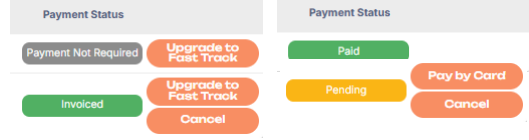
You will find the Payment Status on the right side of the vessel, you will also be able to make some changes depending on the payment method used.
a. Payment Not Required = XML orders do not require payment, the XML will be sent to the flag automatically
b. Pending = waiting for payment to be cleared. Pending orders can be cancelled, cannot be upgraded to fast tracked until paid status. To provide proof of payment please contact our Finance team on finance@polestarglobal.com
c. Invoiced = Invoiced as per the agreed credit terms (for those with credit terms). Orders can be upgraded from Standard Delivery to Fast Track within 24 hours (1 working day) or cancelled
d. Paid = cleared payment for proforma invoice and credit card payment methods, orders cannot be cancelled after this status.
e. You can pay by card if you first select Proforma Invoice.